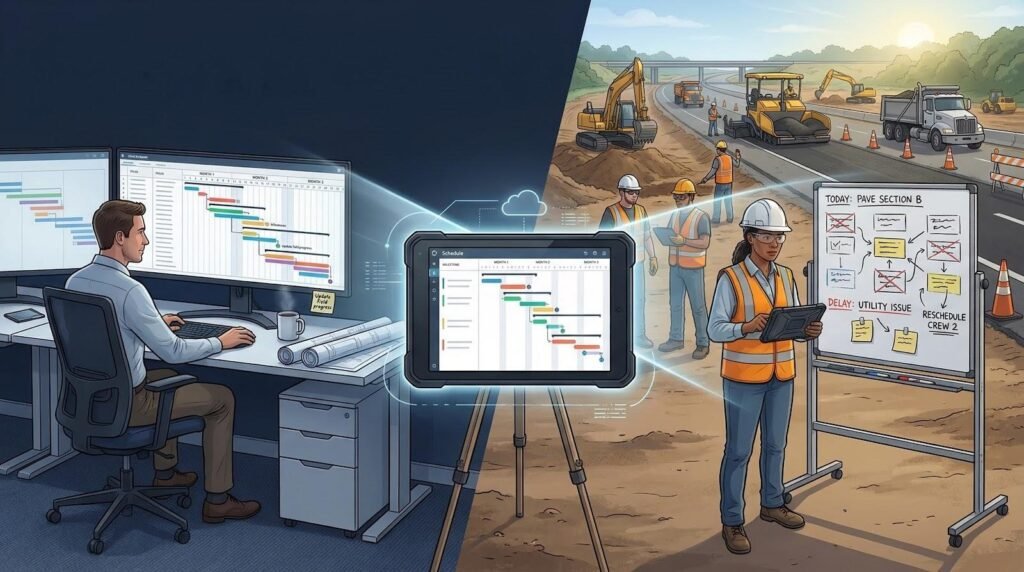
Picture a six-mile highway expansion where a thousand-line CPM sits in the office while crews rely on whiteboards that change by the hour. The two versions of “the plan” drift, burning float and patience.
We’ve felt that pain, so this guide spotlights the platforms that reunite office and field. Each pick earned its place for civil horsepower—linear charts, crew-level look-aheads, and the muscle to tackle mega-projects.
Our shortlist draws on independent analyst reviews, fresh release notes, and boots-on-the-ground feedback. Procore’s February 2026 launch alone shows how real-time collaboration can spell the difference between on-time delivery and costly claims.
Why heavy-civil work demands specialized scheduling
High-rise builders worry about floor cycles.
Highway crews worry about miles of asphalt, lane closures, and the way ten minutes of rain can erase a concrete pour.
Civil jobs span huge sites, run for years, and depend on equipment that costs five figures an hour to sit idle. A generic Gantt can log those facts, yet it rarely manages them.
Take linear production.
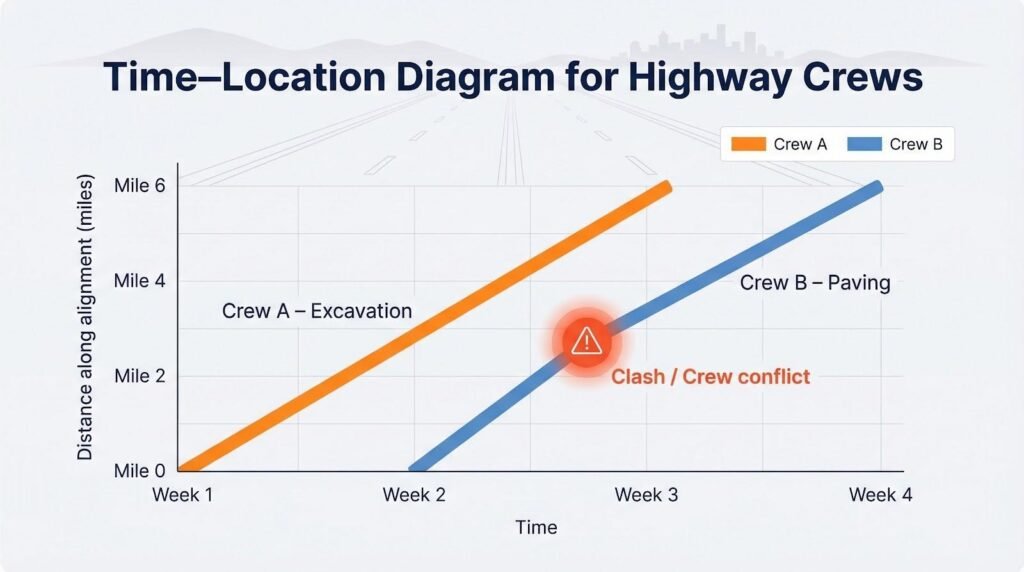
When work moves down a corridor—rail line, pipeline, roadway—you care less about dates and more about where Crew A will cross paths with Crew B. Only a time-location diagram flags that clash before it happens.
Scale adds pressure.
A bridge replacement can exceed 4,000 activities before the first beam ships. Factor in change orders and environmental windows, and the schedule swells again. Legacy desktop apps start to crawl, while spreadsheets crash outright.
Then comes the field-office gap.
Schedulers refine critical paths at HQ while superintendents rebuild three-week look-aheads in Excel because the “official” tool feels foreign. Hours later both sides debate which version is right. Modern platforms close that gap with mobile updates and live dashboards every crew can read.
Civil owners such as DOTs and transit agencies often link pay applications and liquidated damages to certified CPM updates. Miss a float drop or logic break and the resulting claim can dwarf the cost of software.
The takeaway: heavy-civil work needs scheduling tech that speaks its language—distance, production rates, and real-time field feedback—not just bars on a timeline. Up next, you’ll see which tools meet that standard.
How we scored every tool on the list
Choosing software is easier when you can see the yardstick. Before ranking a single platform, we built a scorecard around the pains civil teams face each day: mega-project complexity, field-office friction, and the constant pull between schedule and cost.
Each candidate could earn up to 100 points across seven factors. Civil horsepower and field collaboration sat at the top because a schedule that can’t model critical path or accept real-time crew feedback is a non-starter on a highway or wastewater plant.
Here’s the DNA of our evaluation (weights in parentheses):
- Civil-project capabilities (20): true CPM logic, linear time-location views, resource leveling for fleets
- Field usability and collaboration (20): mobile progress capture, intuitive interface, live multi-user editing
- Integration with cost, BIM, and project controls (15): schedule drift equals money lost
- Scalability and performance (10): thousands of activities without the loading wheel
- Licensing value (10): clear pricing or demonstrable return on investment
- Vendor support and track record (10): proven on ENR-class jobs, responsive help desks
- Stand-out innovation (5): AI scenario engines, 4D simulations, predictive risk flags
We validated scores through demos, release notes, and third-party reviews, then checked them with three practicing schedulers who manage bridge, rail, and utility work.
The final ranking reflects those weighted totals—no pay-to-play, no affiliate padding, just the numbers. With the ground rules set, let’s meet the tools.
1. InEight: enterprise muscle for mega infrastructure
If your project budget has nine zeros and the owner wants cost, schedule, and risk in one dashboard, start here.
InEight was forged inside Kiewit’s project-controls group, so it speaks heavy-civil fluently: critical paths that span years, multiple baselines, and fleets that burn diesel and dollars in equal measure.
Open the scheduling module and you see more than bars on a timeline. Durations pull from historical production rates, while what-if scenarios let planners trim months without breaking logic. An estimator can push updated quantities straight from takeoff to the schedule, and earned-value charts refresh before the coffee cools.
Field link is where legacy giants stumble. InEight lets superintendents update progress on a tablet, keeps the master CPM intact, and records every tweak in an audit log your claims team will appreciate. One controls manager reported importing yesterday’s P6 file, letting crews plan the next three weeks in InEight, then exporting an owner-ready update the same afternoon.
Size does not slow it down. Users on a four-billion-dollar interstate program loaded more than 10,000 activities with no lag.
Pricing is negotiated per deployment, so small firms often look elsewhere. Yet large programs find the license cost replaces several standalone tools and the consultants needed to connect them.
Best fit: DOT megaprojects, design-build-finance concessions, and owner-operators who want schedule, cost, and risk under one roof.
Watch-outs: Plan time for onboarding. The platform is deep, and teams moving from spreadsheets need guided training to unlock full value.
2. Oracle Primavera P6: the CPM workhorse everyone knows
Ask ten DOT schedulers for the spec, and at least eight will mention P6. Oracle’s veteran platform has guided critical-path schedules on tunnels, dams, and transit megaprojects for two decades.
Strength begins with depth. P6 handles calendars for night shifts and tidal windows, models multiple float paths, and can juggle 50,000 activities without hesitation. Need resource leveling across three concurrent bridge contracts? It has a dialog box for that.
Owners value the rigor. Contract language often requires a monthly XER, so using P6 keeps submittals smooth. Risk modules support Monte Carlo analysis, and earned-value curves feed directly into board-ready reports.
Yet power brings baggage. The interface feels locked in 2005, and new users face a steep learning curve. Field crews rarely touch it; a specialist in the main office guards the file while superintendents mark up PDFs. That gap allows versions to drift, the very issue modern cloud tools aim to solve.
Performance remains reliable on a proper database, but standalone laptop installs slow once activity counts soar. And while Oracle’s subscription model has eased the old sticker shock, licenses still sit in enterprise territory.
Best fit: Projects that require formal CPM deliverables, multi-prime programs, and teams with seasoned schedulers.
Watch-outs: Collaboration is export-import, not real time. Pair P6 with a field-friendly companion such as Procore, Planera, or even Excel if you want crews updating progress without passing XER files.
3. Microsoft Project: familiar, flexible, and surprisingly capable
Sometimes the right choice is the tool your team already knows.
Microsoft Project ships with Office bundles, opens quickly, and lets a site engineer drag tasks without reading a manual.
For small-to-mid-size civil jobs, that simplicity is valuable.
You still get true critical-path math, multiple calendars, and a clean Gantt that prints well for the job-site trailer.
The cloud edition adds browser access, so a foreman can tweak a two-week look-ahead from a pickup truck.
Integration is MSP’s hidden ace.
Because it lives in the Microsoft ecosystem, you can push updates to Excel dashboards, share a read-only schedule in Teams, or store the master file in SharePoint so everyone opens the same version.
Limits appear as the project grows.
Load a 5,000-activity freeway rebuild and performance slows.
Resource leveling across multiple projects feels clunky, and there is no native linear chart for distance-based work.
Owners who require XER files will still ask you to convert the plan into Primavera before submittal.
Cost is gentle.
A Project Plan 3 subscription costs less than many contractors spend on coffee each month, and perpetual desktop licenses remain an option for offline sites.
Best fit: Regional contractors, municipal road jobs, subcontractor schedules feeding a prime’s master CPM.
Watch-outs: When your schedule needs detailed risk analysis or time-location diagrams, move to a heavier platform or pair MSP with a niche add-on like Tilos.
4. Procore Scheduling: real-time updates where crews already work
If your field teams already rely on Procore for drawings, RFIs, and daily logs, its new scheduling module feels like adding another switch in the same room.
Released to general availability in February 2026, Procore Scheduling gives every project member a live Gantt inside the platform they open each morning. No extra logins, no emailed PDFs; the latest schedule travels the same data path as submittals and observations.
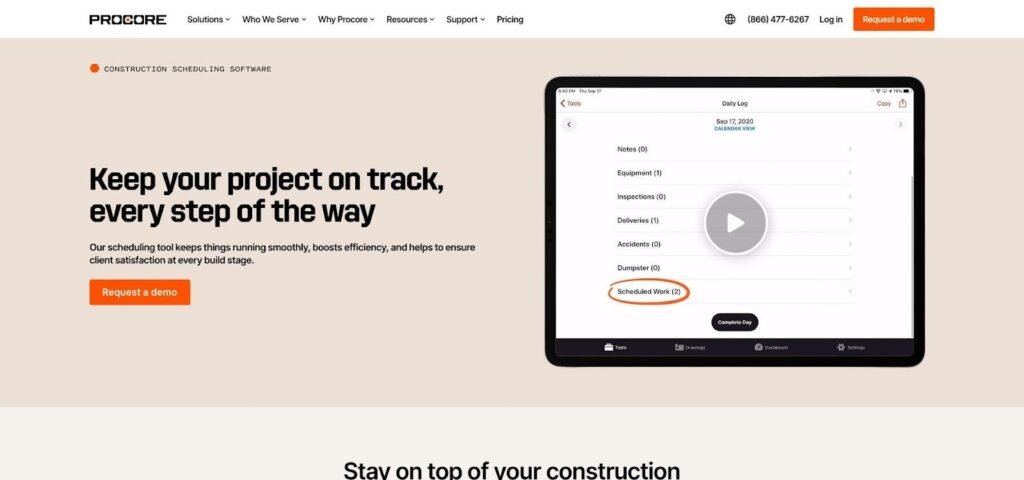
Procore Scheduling live Gantt view for civil construction projects
Accountability sits at the core. Planners assign each activity to a trade or person, so supers see at a glance what must finish this week. Crews record progress on an iPad, percentages rise in real time, and the office sees delays as they occur, the field-office sync we outlined earlier.
Look-ahead meetings move faster because the module can produce a rolling three-week view without exporting to Excel. If your baseline still lives in P6, Procore’s integration keeps that master schedule authoritative while day-to-day adjustments happen in the cloud.
There are limits. Complex CPM logic is thin, and multi-project resource leveling is not available yet. You also need a Procore subscription; this is not a standalone option for teams on other ecosystems.
Best fit: Contractors already invested in Procore who need live, field-driven updates more than advanced forensic analysis.
Watch-outs: Heavy infrastructure jobs still submit an XER to the owner, so keep Primavera in the background until Procore matures further.
5. Planera: collaborative scheduling without the learning curve
Picture a Google Doc for CPM schedules. That comparison captures Planera’s appeal, and it explains why design-build teams have adopted the platform since its mid-2020s debut.
Open a project and several users can drag, drop, and link tasks in real time while a critical-path engine recalculates float behind the scenes. No one hunts for a relationship menu; you draw a line between bars and watch the update appear.
This live co-authoring solves a common civil headache: getting superintendents, owners, and designers into the same room—virtual or physical—to confirm sequence before work begins. Planera logs every change, so if yesterday’s idea proves risky, you revert with one click.
Field execution receives attention too. Look-ahead views pull directly from the master schedule, and crews record percent complete on their phones. Because the interface feels closer to Trello than to Primavera, adoption happens fast, even for staff who usually avoid scheduling tools.
Limitations appear on large programs. Schedules above 15,000 activities can slow, and advanced analytics such as Monte Carlo risk remain on the roadmap. Linear time-distance charts still require exporting data to a specialty tool.
Pricing follows a per-user SaaS model and lands between Office 365 and enterprise suites, which makes Planera an easy pilot for midsize contractors.
Best fit: Design-build and progressive-delivery jobs where planners want every stakeholder collaborating live instead of trading PDFs.
Watch-outs: For DOT contracts that require P6 submittals, keep Planera as the sandbox and export to Primavera for the official file.
6. Bentley Synchro 4D: see the schedule before you build it
Gantt bars show when work happens. Synchro adds the missing dimension, showing where every excavator, crane, and crew will stand on a given day.
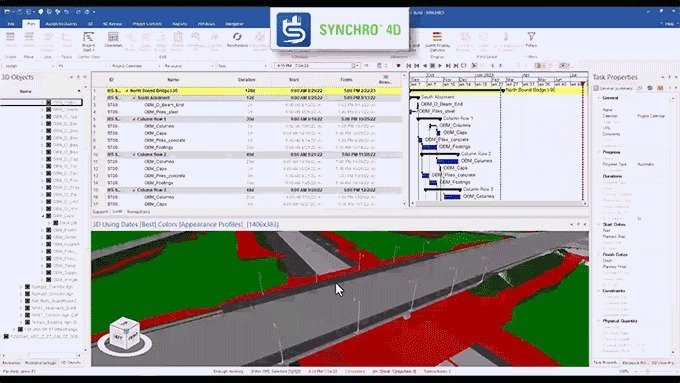
Bentley Synchro 4D model-based construction scheduling interface
Upload a 3D model, link elements to tasks, and press play. The site springs to life: bridge spans slide into place, paving crews move down the corridor, and you spot a conflict where rebar installers share deck space with form removal. Catching that clash on a laptop beats discovering it behind traffic cones.
Civil planners rely on Synchro for more than visuals. Time–location sequencing helps stage lane closures, and the software creates resource histograms so you know exactly when two concrete pumps overlap. Synchro Field closes the loop by letting inspectors log installed quantities that feed progress back to the 4D model.
The power carries prerequisites. You need a clean BIM model and a planner comfortable with both CPM logic and 3D geometry. Expect a learning curve and workstation-class hardware; Synchro rewards commitment but is unforgiving to half-hearted trials.
Licensing falls in the enterprise tier, usually as part of Bentley’s infrastructure suite. On a billion-dollar rail extension those fees disappear into contingency, yet they can feel steep on a ten-million-dollar culvert.
Best fit: Mega projects where spatial logistics—tower cranes, haul roads, utility clashes—drive risk more than pure critical path.
Watch-outs: Without a mature BIM workflow, Synchro can turn into an expensive animation studio. Verify model completeness and team skills, then roll it out phase by phase.
7. HCSS HeavyJob: daily reports become short-range schedules
Field productivity drives profit in heavy civil work.
HCSS HeavyJob turns the daily diary into the engine of short-interval planning.
Superintendents open the iPad app they already use for timecards, add tomorrow’s crew tasks, and HeavyJob rolls those entries into a living two-week schedule.
When foremen clock out, production quantities sync to the office, instantly showing whether pipe install or paving runs ahead or behind plan.
Because HeavyJob links back to HeavyBid, target labor hours and equipment rates flow directly from the estimate.
Each morning you see earned hours versus planned, a quick check that flags slippage before it erodes float.
HeavyJob is not a full CPM engine.
Most contractors still keep a master schedule in P6 or MSP and rely on HeavyJob for the field view.
That split works because crews care less about total float than about which trench to dig after lunch.
Implementation is straightforward if you already use HCSS products; adding seats extends the license.
For new customers, the ecosystem lands in a middle price bracket, costing more than a SaaS point solution yet less than an enterprise suite.
Best fit: Self-performing earthwork, utility, and paving contractors who track production as closely as dates.
Watch-outs: HeavyJob will not generate a spec-ready narrative or time-location chart. Pair it with a CPM tool for contractual reporting, and let HeavyJob own the last 14 days where actual shovels hit dirt.
8. Fieldwire: lightweight task-to-schedule for the jobsite
Fieldwire began as a punch-list app, yet its task board now anchors look-ahead schedules for thousands of field teams.
Add a task, drop it on the plan sheet, and set the due date.
Those cards roll into a calendar or Gantt lane that superintendents print for the morning huddle.
Because every task sits on a drawing, crews instantly know where the work is, not just when it should happen.
Civil contractors use that visual link to divide a long alignment into bite-sized zones.
Need the pipe crew to stay 500 ft ahead of the backfill gang?
Color-code the tasks, watch the distance buffer shrink or grow in real time, and shuffle assignments before equipment idles.
Adoption stays simple: a free tier covers five users, and the mobile app works offline in remote corridors.
Fieldwire also syncs issues and photos back to Procore or Box, keeping the wider project record up to date.
Trade-offs follow the simplicity.
There is no critical-path calc, no resource leveling, and exporting to P6 means stripping schedules to CSV basics.
Treat Fieldwire as the jobsite whiteboard rather than the contract-ready master plan.
Best fit: Crews who want a visual, map-based task list for the next 21 days and prefer to avoid heavyweight software.
Watch-outs: Once the task count climbs past a few thousand, boards feel crowded. Use Fieldwire for execution detail and rely on a CPM engine for the big picture.
9. Touchplan: digital Last Planner® for crew commitment
Lean construction thrives on kept promises.
Touchplan converts the sticky-note pull-planning ritual into a cloud workspace teams can update from anywhere.
Open a phase plan and each trade drags colored tiles onto the timeline, declaring the exact day they will finish their slice of work.
Constraints such as permits, inspections, and material deliveries sit on a separate lane, so blockers surface before crews arrive on site.
At week’s end, Touchplan calculates Percent Plan Complete.
Missed promises glow red, triggering a quick root-cause chat instead of end-of-project finger-pointing.
Civil jobs benefit because many delays stem from external holds like utility conflicts or agency approvals, now tracked as first-class items.
The interface feels friendlier than CPM software, so field foremen participate instead of tuning out.
Owners appreciate the transparency; everyone sees real progress versus commitment without decoding float paths.
Touchplan is not a master scheduler.
You still export milestones to P6, and there is no resource leveling, but that is the point: it shines in the last fifty feet of planning where buy-in matters more than math.
Pricing runs per project per month, making it easy to pilot on a single bridge rehab before rolling out program-wide.
Best fit: Design-build teams practicing Lean, joint ventures juggling many subcontractors, and any job where daily coordination is chaotic.
Watch-outs: Success depends on culture, not clicks.
If leadership skips weekly commitment reviews, the colored tiles quickly lose their influence.
10. SmartPM: x-ray vision for your CPM schedule
Schedules can hide problems.
Activities drift, logic fails, and a glossy PDF masks the damage until claims arrive. SmartPM works as a forensic auditor, scanning each P6 or MSP update and flagging trouble before it turns into liquidated damages.
Upload last month’s XER and today’s version, and within minutes the dashboard highlights open ends, out-of-sequence work, and lost float. Delay paths appear as color-coded threads that reveal whether weather, late design, or labor shortages pushed the finish.
Project controls teams appreciate the time saved. Tasks that once required weekend Excel marathons now produce a one-page variance report. Executives see clear metrics such as schedule quality score, compression required, and risk to completion without reading a Gantt.
SmartPM does not build schedules; it grades them. You still plan in P6, then let SmartPM expose gaps and test recovery scenarios. Pricing sits in the enterprise tier, sold as a portfolio subscription that covers every project you feed it.
Best fit: Owners and large contractors who update CPM schedules monthly and need defensible data for pay applications, audits, or potential disputes.
Watch-outs: Smaller firms may hesitate at another platform. The tool delivers value only when you provide consistent, well-maintained updates; poor data still produces poor insight.
11. Trimble Tilos: time-distance control for linear projects
Highways, rail corridors, and pipelines move through miles of terrain, not stacked floors. Traditional Gantt charts hide that geography; Tilos places it front and center with a time–location diagram.
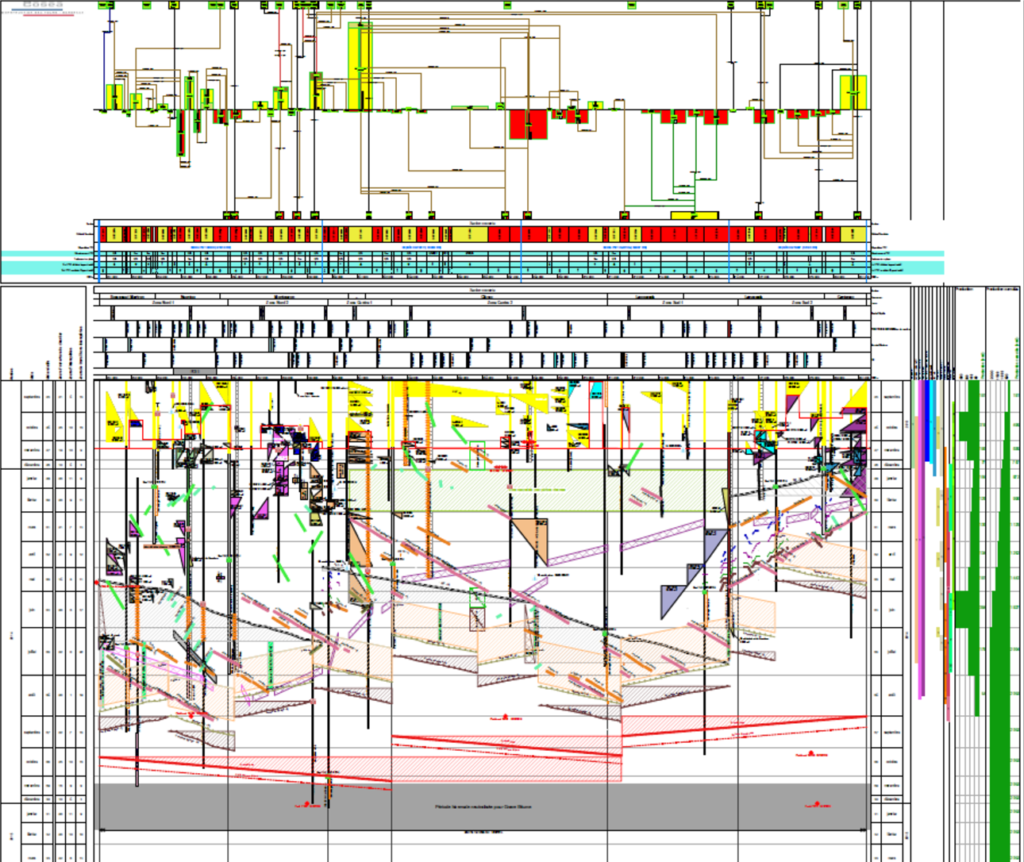
Trimble Tilos time-distance diagram for linear civil projects
Picture distance on the Y-axis and calendar on the X. Each crew appears as a slanted bar marching down the page. If the paving gang’s line intersects the guardrail crew’s line, you have scheduled a traffic jam before work begins.
Civil planners rely on those visuals to fine-tune production rates. Speed up earthwork by ten percent and you immediately see whether asphalt plants must ramp up or whether crews will sit idle waiting for base course. Mass-haul tools even calculate the most efficient dirt moves, trimming wasted truck miles.
Data flows both ways. Export the plan to Primavera for the owner, or import an XER to update progress in Tilos. Mapping plugins overlay the alignment on Google Maps so stakeholders grasp the phasing without decoding symbols.
The trade-off is focus. Tilos excels at linear work and offers little beyond; vertical or plant projects feel out of place. Licenses cost a few thousand dollars per user—easy to justify on a 50-mile freeway, harder on a short utility trench.
Best fit: DOT and pipeline schedules where location, not just logic, drives risk.
Watch-outs: Training is essential. Planners unfamiliar with time-distance charts need a crash course, or the power stays locked behind unfamiliar icons.
12. Oracle Primavera Cloud: CPM power meets browser convenience
Oracle knew P6 needed a modern sibling, so it built Primavera Cloud, a web suite that keeps the heavy analytics while removing desktop constraints.
Open a project in your browser and you still see multi-float paths, resource curves, and risk simulations, yet everything lives in a shared database.
Schedulers stop emailing XER files, field engineers log progress with the same link, and executives scroll portfolio dashboards without Citrix workarounds.
A standout is the built-in Lean Task module. Sticky-note pull planning sits beside the CPM schedule, so short-interval commitments roll directly into the master logic instead of languishing in a spreadsheet.
Integration across Oracle’s construction cloud is tight. RFIs from Aconex can drive schedule impacts, and Unifier cost data feeds earned-value widgets, giving owner-operators real-time budget versus time in one pane.
Caveats remain. The product is young, so veteran P6 users meet occasional missing features and browser lag on very large files. Licensing is subscription only and, while cheaper than running your own P6 servers, it still targets enterprise budgets.
Best fit: Agencies and large contractors that want to stay in the Primavera family while gaining true cloud collaboration.
Watch-outs: Migration takes planning. Clean up legacy codes and calendars before import, or you will carry old P6 quirks into the new environment.
Quick comparison table: scan before you short-list
Sometimes you have only a minute between meetings to sanity-check options. The matrix below distills the twelve tools into headline traits you can review at a glance.
| Tool | Civil horsepower* | Field updates | Linear charts | 4D/BIM | Price tier** | Free trial |
| InEight | 9/10 | ✔ | ◐ (segment-based) | ◐ (via model tie-in) | $$ | Demo |
| Primavera P6 | 10/10 | ✖ | ✖ | Add-on | $$ | None |
| MS Project | 6/10 | ◐ (SharePoint) | ✖ | Plug-ins | $ | 30 days |
| Procore Scheduling | 7/10 | ✔ | ✖ | ✖ | $$ (with Procore) | Included |
| Planera | 7/10 | ✔ | ✖ | ✖ | $ | Demo |
| Synchro 4D | 9/10 | ◐ (Synchro Field) | ◐ (via 4D) | ✔ | $$ | Demo |
| HCSS HeavyJob | 5/10 | ✔ | ✖ | ✖ | $ | Demo |
| Fieldwire | 4/10 | ✔ | ✖ | ✖ | $ | Free tier |
| Touchplan | 5/10 | ✔ | ✖ | ✖ | $ | Demo |
| SmartPM | 2/10 (analysis only) | ✖ | ✖ | ✖ | $$ | Demo |
| Trimble Tilos | 8/10 | ✖ | ✔ | ✖ | $$ | Demo |
| Primavera Cloud | 9/10 | ✔ | ✖ | ◐ (via Aconex) | $$ | Trial |
*Civil horsepower scores the ability to run large CPM logic, resource leveling, and infrastructure-specific features.
**Relative tiers: $ (< $30 per user per month), $ ($30–100), $$ (enterprise mid), $$ (enterprise high).
Treat the table as a compass, not a contract. A checkmark shows native capability; a half-circle indicates that the feature arrives through integrations or partial tools. For deeper context on strengths, limits, and pricing nuance, return to the individual reviews.
How to choose the right scheduling tool for your civil project
Start with the project, not the software.
A $25 million county-road widening led by a lean crew has different pain points from a $2 billion light-rail extension with dozens of stakeholders.
List the three worst scheduling headaches you face today: maybe field updates lag, the owner demands P6 files, or linear clashes keep surprising crews.
Those problems become your selection blueprint.
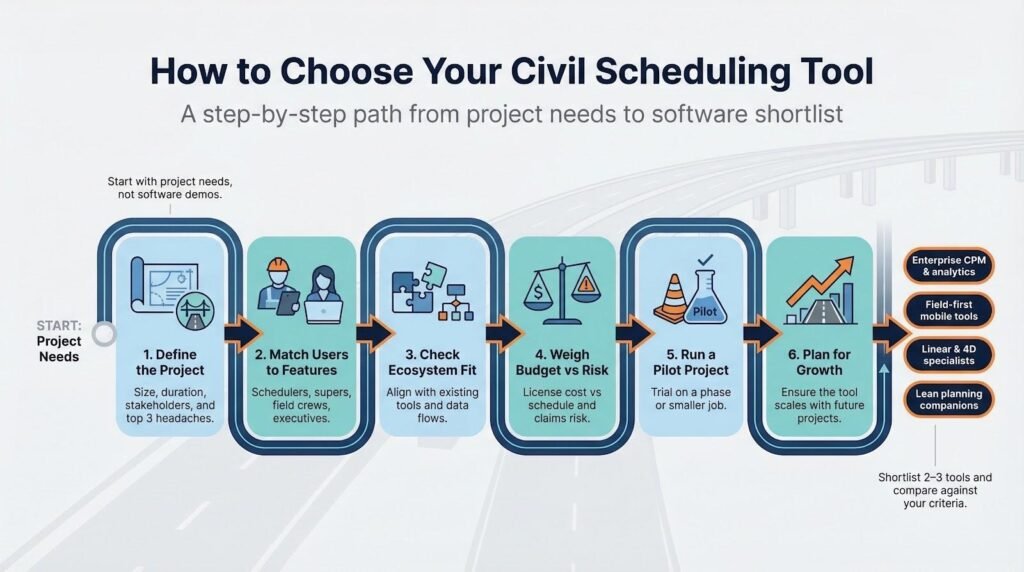
Next, match users to features.
If superintendents refuse to open a laptop, a mobile-first tool such as Fieldwire or Procore Scheduling saves more time than any advanced CPM engine.
If the contract calls for monthly fragnet narratives, you need Primavera-level horsepower or SmartPM analytics.
Check ecosystem fit.
Already deep in Procore? Use its native schedule module.
Running HCSS for cost codes? HeavyJob will feel familiar.
The less data you re-enter, the faster teams adopt the new workflow.
Budget matters, but view it through the lens of risk.
A six-figure Synchro license sounds steep until the 4D clash it uncovers prevents a week-long lane closure that would have cost more.
On smaller jobs, a Planera subscription or Fieldwire’s free tier can tighten coordination without inflating overhead.
Pilot before committing.
Launch a short test project or a single phase of a larger job.
Give both office and field voices equal weight in feedback; if the tool lives only on a planner’s desktop, you picked the wrong one.
Finally, plan for growth.
Choose a platform you will not outgrow in a year.
Civil backlogs swing fast: today’s $10 million bridge rehab can become tomorrow’s interstate expansion bid, and migrating schedules mid-project is pain you can avoid with a forward-looking choice.