Inspection teams rarely struggle to collect information. The harder problem is keeping inspection records, photographs, locations, corrective actions, responsible employees, deadlines, and final approvals connected throughout the entire process.
Paper checklists and spreadsheets can record findings, but they become difficult to manage across multiple locations. General-purpose task managers help assign work, yet they often lack inspection templates, evidence capture, asset histories, spatial context, and structured corrective-action workflows.
Inspection management software brings these elements together. The right platform can standardize inspections, show where an issue was discovered, assign corrective work, and preserve evidence of how the problem was resolved.
This comparison covers seven inspection management platforms with different strengths. Some focus on checklists and compliance, some on maintenance or geographic field data, while others provide visual context through plans or 3D tours.
Inspection Management Software Comparison
| Software | Best suited for | Distinguishing capability |
| ScanTrack | Visual inspections and tasks inside buildings and facilities | Tasks linked to exact locations inside 3D tours |
| SafetyCulture | Standardized inspections, audits, and operational checks | Digital checklists, issue reporting, and assigned actions |
| MaintainX | Equipment inspections and maintenance operations | Inspections connected with work orders and asset histories |
| Fulcrum | Field inspections across geographically distributed assets | GPS-based data collection and GIS-oriented workflows |
| PlanRadar | Construction, property, and facility inspections | Inspection tickets positioned on plans and BIM models |
| Lumiform | Configurable audits and recurring inspections | Flexible checklists and tracked corrective actions |
| GoCanvas | Replacing paper inspection forms with mobile workflows | Custom mobile forms, approvals, photos, and reports |
There is no single platform that is best for every organization. The right choice depends on whether the team primarily inspects rooms, equipment, construction work, distributed field assets, or repeatable operational processes.
1. ScanTrack
ScanTrack is designed for inspections and task management connected with physical locations inside buildings, facilities, and other properties.
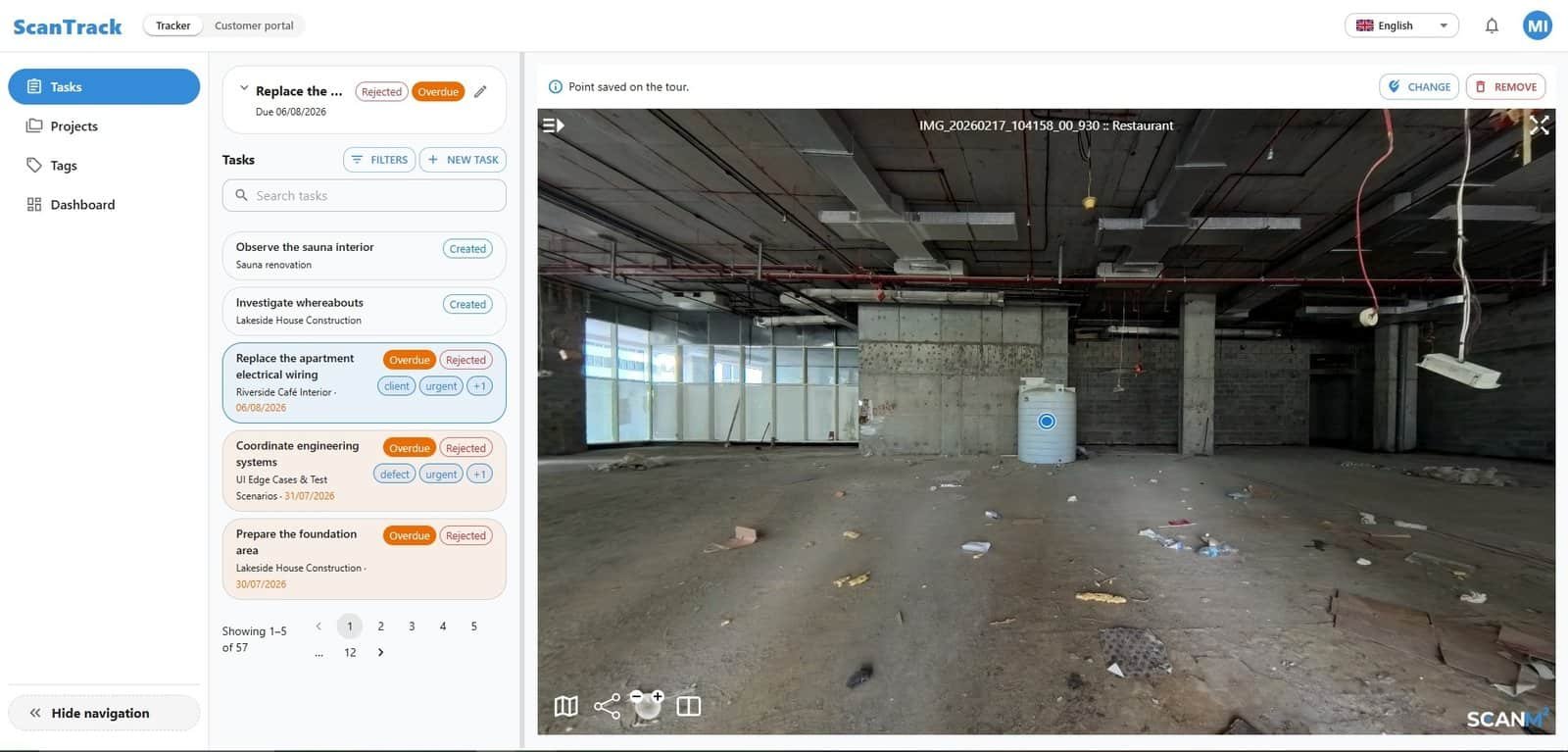
Instead of storing an issue only as a checklist response or isolated task, ScanTrack lets the user mark the relevant point inside a 3D virtual tour. The task retains the surrounding visual context, helping the responsible person understand exactly where the issue was found.
An inspector or manager can navigate through the tour, select a location, describe the problem, assign the task, set a deadline, and attach supporting materials. The responsible employee or contractor can then submit photographs, comments, or other evidence. The manager reviews the result and either closes the task or requests additional work.
Key strengths
- tasks connected with exact locations inside 3D tours;
- visual context around each issue;
- assignment of responsible users and deadlines;
- photographs, files, comments, and completion evidence;
- remote review of submitted work;
- a clear workflow from issue discovery to approval.
Best suited for
ScanTrack is particularly relevant for building inspections, renovation projects, facility maintenance, property management, manufacturing sites, warehouses, hotels, commercial properties, and other environments where a written location description is not precise enough.
Points to consider
The organization needs a suitable 3D tour of the property. The tour represents the condition of the object at the time of capture, so current progress must be confirmed through task updates and new photographs. ScanTrack does not replace professional engineering inspections or physical verification when on-site presence is required.
2. SafetyCulture
SafetyCulture is a broad operations platform widely used for inspections, audits, issue reporting, and corrective actions. Teams can create inspection templates, conduct checks through a mobile application, document issues, and assign follow-up actions.
The platform is suitable for organizations that need to standardize recurring inspections across locations. Inspection findings can be converted into actions with owners, deadlines, and status tracking. Reporting and analytics help managers identify repeated failures and compare operational performance.
Key strengths
- configurable inspection templates and checklists;
- mobile inspections and evidence capture;
- issue and incident reporting;
- assigned corrective actions;
- centralized reporting and operational analytics;
- support for repeatable processes across multiple locations.
Best suited for
SafetyCulture is a strong option for safety inspections, operational audits, quality checks, retail locations, hospitality, manufacturing, and organizations that need one system for standardized frontline processes.
Points to consider
Its main strength is structured inspection management rather than detailed spatial visualization. Teams that need every issue positioned within a room or virtual building environment may require an additional visual system.
3. MaintainX
MaintainX combines inspections with maintenance management, work orders, preventive maintenance, and equipment records. It is especially useful when a failed inspection should immediately lead to maintenance work.
Teams can convert paper procedures into digital checklists, assign recurring inspections, and connect findings with work orders. Equipment records and maintenance histories provide context for deciding whether an asset needs repair, servicing, or replacement.
Key strengths
- digital inspection and maintenance procedures;
- work orders and approval workflows;
- preventive and recurring maintenance schedules;
- searchable inspection histories;
- equipment and asset records;
- barcode and QR code access to asset information.
Best suited for
MaintainX fits manufacturing plants, warehouses, facility operations, fleets, and maintenance departments where inspections are closely connected with equipment reliability and preventive maintenance.
Points to consider
The platform is oriented toward assets, work orders, and maintenance processes. It is less focused on visual navigation through rooms and buildings.
4. Fulcrum
Fulcrum is a field data collection and inspection platform built around geographic location. It allows field teams to collect forms, photographs, signatures, measurements, inspection results, and GPS coordinates through mobile devices.
Location information can be captured automatically, helping organizations verify where an inspection took place. Fulcrum is particularly relevant for infrastructure, utilities, environmental work, engineering surveys, and inspections covering distributed outdoor assets.
Key strengths
- GPS-based inspection records;
- configurable mobile forms;
- photographs, signatures, measurements, and other field evidence;
- offline field data collection;
- integration with GIS and enterprise systems;
- mapping of distributed assets and inspection locations.
Best suited for
Fulcrum works well for utility networks, roads, environmental inspections, telecommunications infrastructure, public assets, and other field operations where geographic coordinates are more important than indoor visual navigation.
Points to consider
Its location model is primarily map and GPS based. Teams inspecting rooms or individual elements inside a building may need more detailed indoor context.
5. PlanRadar
PlanRadar is designed for construction, real estate, and facility workflows. Inspection items can be created as tickets and positioned on digital plans or BIM models, allowing teams to connect findings with specific parts of a project.
Custom forms and checklists support different inspection types. Users can document defects, assign responsible parties, add photographs, track progress, and generate reports. Recurring reminders can also support regular facility checks and maintenance activities.
Key strengths
- inspection tickets positioned on plans;
- support for BIM models and construction documentation;
- customizable forms and checklists;
- defect and snagging workflows;
- photographs, responsibilities, deadlines, and status tracking;
- configurable inspection reports.
Best suited for
PlanRadar is a strong choice for construction quality control, property inspections, defect management, handover processes, and facility management teams already working with digital plans.
Points to consider
The platform covers a broad range of construction and property workflows. Organizations looking only for a lightweight visual task tracker may find its scope wider than necessary.
6. Lumiform
Lumiform focuses on mobile inspections, audits, checklists, and corrective actions. Organizations can create their own forms or use prepared templates for safety, quality, compliance, operational, and industry-specific inspections.
When an inspection identifies a problem, the platform can create a corrective action, assign an owner and deadline, and track the issue until it is resolved. Offline operation, evidence capture, signatures, reports, and dashboards support teams working across multiple locations.
Key strengths
- customizable inspection and audit checklists;
- conditional logic and scoring;
- mobile and offline inspections;
- photographs, notes, and electronic signatures;
- corrective actions with owners and deadlines;
- dashboards and exportable reports.
Best suited for
Lumiform is appropriate for quality teams, safety departments, restaurant chains, manufacturers, logistics operations, and organizations that need to standardize inspections without building a custom system.
Points to consider
Lumiform provides strong checklist and action workflows, but its core experience is form based rather than centered on a visual representation of the inspected property.
7. GoCanvas
GoCanvas helps companies replace paper inspection forms with customizable mobile workflows. Teams can build digital forms, dispatch inspections to field workers, collect photographs and signatures, and route completed reports for review or approval.
The platform is flexible and can support many types of inspections without requiring a highly specialized industry application. Automated reports reduce the need to re-enter information collected in the field.
Key strengths
- drag-and-drop mobile form builder;
- photographs and digital signatures;
- inspection dispatch and workflow routing;
- review, approval, and rejection steps;
- automatically generated reports;
- templates for different industries and inspection types.
Best suited for
GoCanvas is useful for service companies, contractors, field operations, safety teams, equipment inspections, and businesses transitioning from paper or PDF forms to mobile data collection.
Points to consider
Its flexibility comes primarily from configurable forms. Organizations that need inspections linked to detailed spatial models, plans, or 3D environments may require a more specialized visual platform.
How to Choose Inspection Management Software
Before selecting a platform, define how inspections are actually performed and what happens after an issue is found.
Determine the required location context
Different platforms represent location in different ways:
- a 3D tour for indoor visual context;
- a floor plan or BIM model for construction and property workflows;
- GPS coordinates and maps for outdoor assets;
- an asset record or QR code for equipment;
- a site name or form field for standardized operational checks.
The right approach depends on whether employees need to identify a building, room, surface, machine, or geographically distributed asset.
Review the corrective-action process
An inspection system should do more than record a failed item. Check whether the platform can:
- create a follow-up task;
- assign a responsible person;
- establish a deadline;
- collect evidence of completion;
- support review or approval;
- preserve the full action history.
Consider mobile and offline work
Field inspectors may work in basements, production areas, remote sites, or unfinished buildings with unreliable connectivity. Offline access can therefore be essential.
Evaluate reporting requirements
Some teams need a straightforward PDF report. Others require dashboards, trend analysis, asset histories, audit trails, GIS integrations, or data exports into existing enterprise systems.
Test the software with a real inspection
A short demonstration rarely exposes workflow problems. A more reliable evaluation is to use the software for a real inspection, assign at least one corrective action, collect completion evidence, and produce the final report.
Final Recommendation
The best inspection management software depends on the type of location and the process that follows an inspection.
ScanTrack stands out when teams need to connect findings and corrective tasks with exact locations inside 3D tours. SafetyCulture and Lumiform are strong choices for standardized checklists and recurring operational inspections. MaintainX is better aligned with equipment maintenance and work orders. Fulcrum is designed for geographically distributed field assets. PlanRadar provides plan-based workflows for construction and property teams, while GoCanvas offers flexible mobile forms for replacing paper processes.
Organizations should choose the system that matches their existing inspection workflow instead of selecting the platform with the longest feature list. The most useful solution is the one that helps inspectors capture the right evidence, shows the responsible person where the problem is located, and keeps corrective work visible until it has been verified.